Consuming Frappe APIs in React/Next.js: A Decoupled Frontend Guide
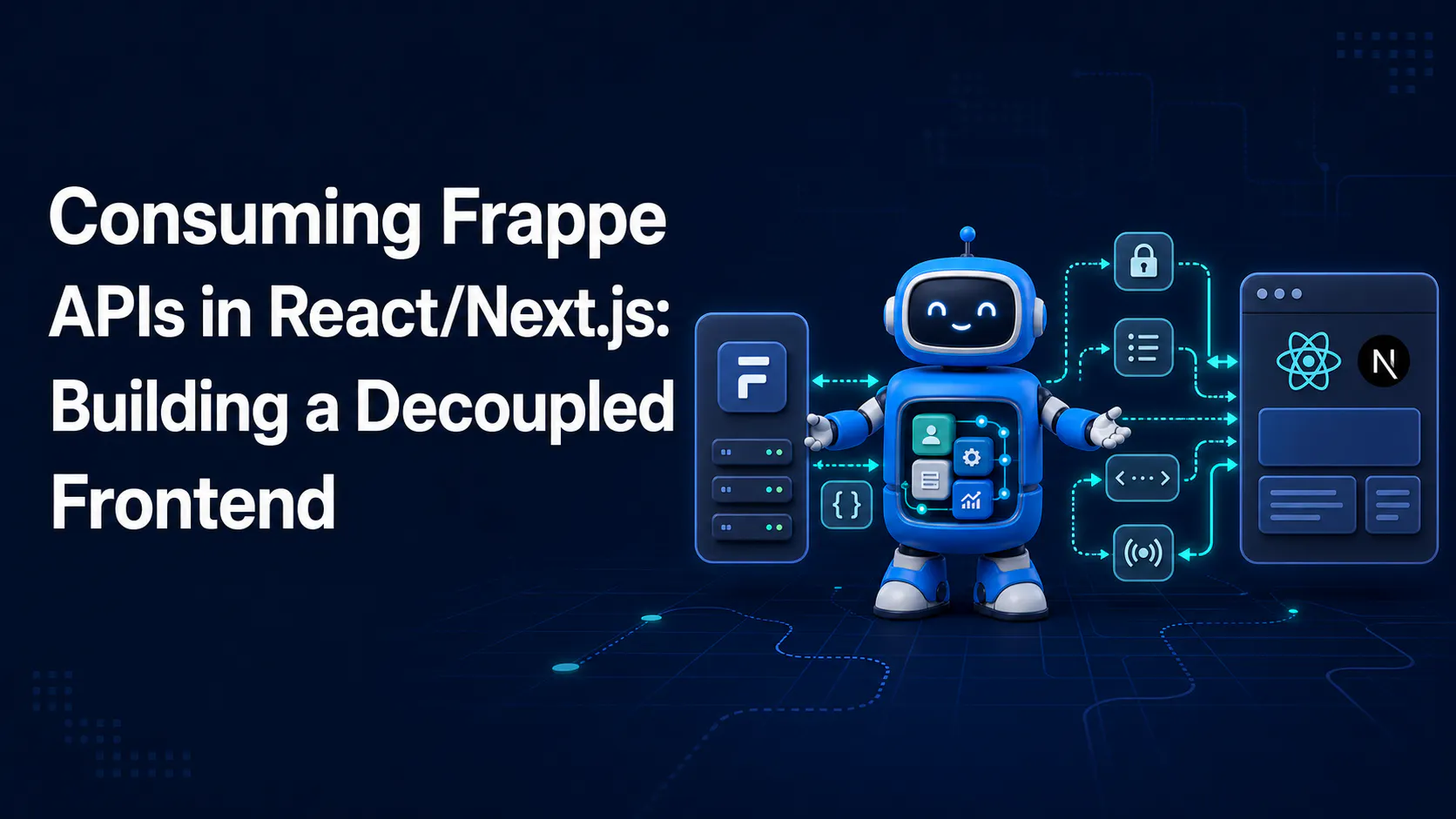
You inherited a Frappe Framework backend that works great for admins — but your end users don't want a data-entry grid with sidebar filters. 🙅 They want a fast, branded interface that feels like a product, not a back office. So can Frappe keep doing what it's good at (data modeling, permissions, workflows) while a completely separate React or Next.js app owns the actual experience?
Yes — and it's a more common pattern than most Frappe docs let on. 🔌 This post covers exactly how to wire the two together: which auth model to use when, how to dodge CORS and cookie landmines, and how to get live updates flowing into your components.
fetch@frappe.whitelist() endpoints work (covered in earlier posts on this blog) — this post builds on that, it doesn't re-derive it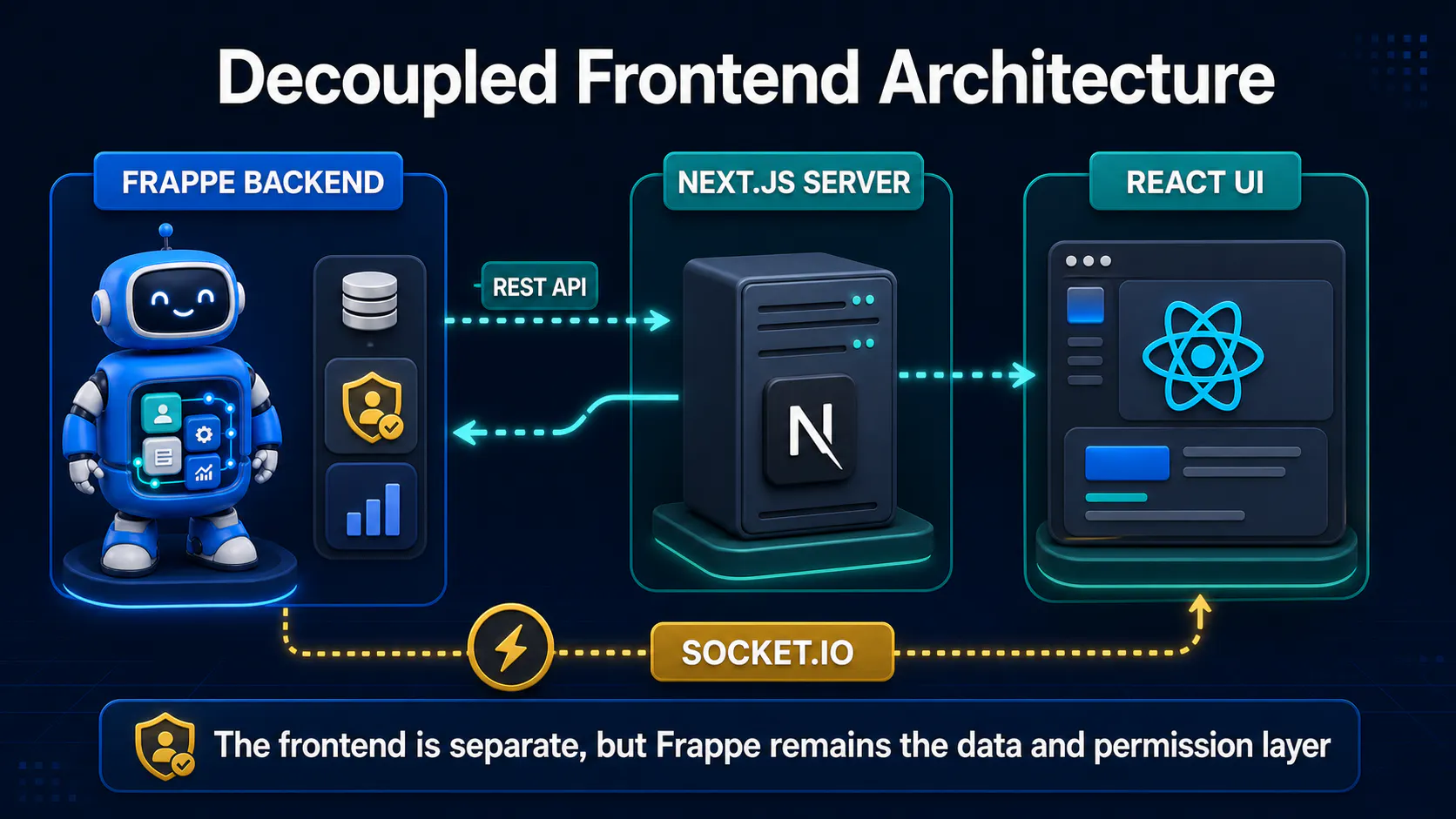
Think of Frappe as a headless backend here: doctypes, permissions, workflows, and business logic all still live there, but nothing in this setup depends on the Desk actually being rendered to your end users.
React or Next.js becomes the presentation layer — it owns routing, styling, and every pixel your end users see. It talks to Frappe purely over HTTP (and, for live data, over a websocket), the same way it might talk to any other API.
The one architectural decision that shapes everything else is how your frontend authenticates. There are two real options, and mixing them up is the single most common source of confusion in decoupled Frappe setups.
Option A 🔐 — API key/secret, called server-side. Your Next.js app's API routes or server components hold a Frappe API key and secret as server-only environment variables, and make authenticated requests on behalf of users. The browser never sees Frappe's credentials at all — your Next.js server acts as a backend-for-frontend (BFF).
Option B 🍪 — session cookie, same-origin. The frontend is served from the same domain (or a subdomain sharing cookies) as Frappe, so after a normal Frappe login the browser already holds a valid sid session cookie. Requests from React include that cookie automatically, just like Desk requests do.
Neither is "more correct" — they suit different deployment shapes, which is why topology gets its own step below. 👇
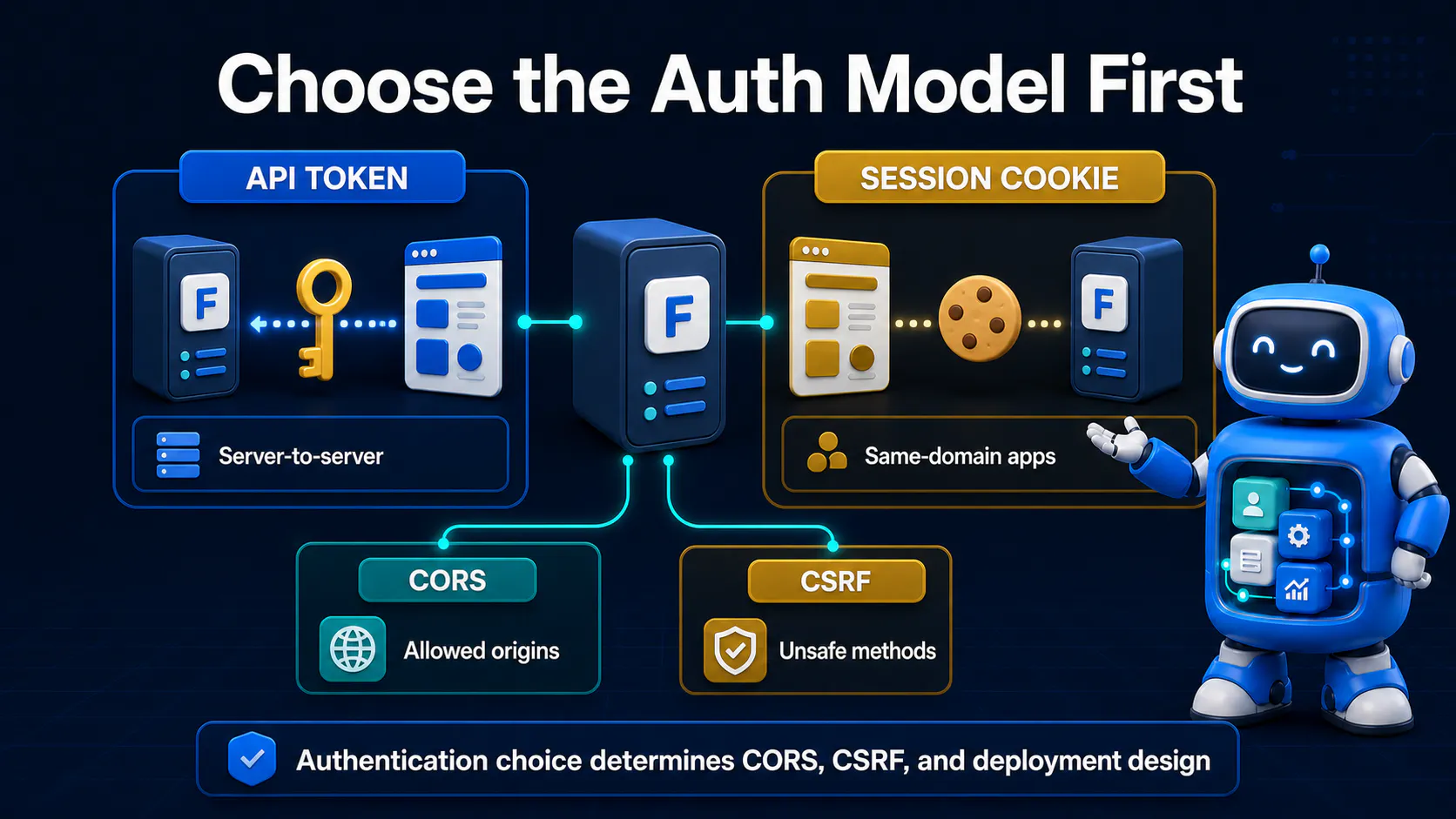
Before touching CORS config or API clients, pin down which model you're building for — it changes almost every step that follows.
🚀 Pick API key/secret via a BFF if your Next.js app is public-facing, deployed independently (Vercel, its own container), and you don't want it to depend on sharing a domain with Frappe.
🍪 Pick session cookie auth if you're serving both Frappe and Next.js from the same domain via a reverse proxy, and you want end users to get a normal browser session that behaves like any other cookie-authenticated app.
💡 Pro Tip: A hybrid is common in practice — session cookies for logged-in user actions, and a server-side API key for anonymous/public reads (like a public catalog page) that shouldn't require a login at all.
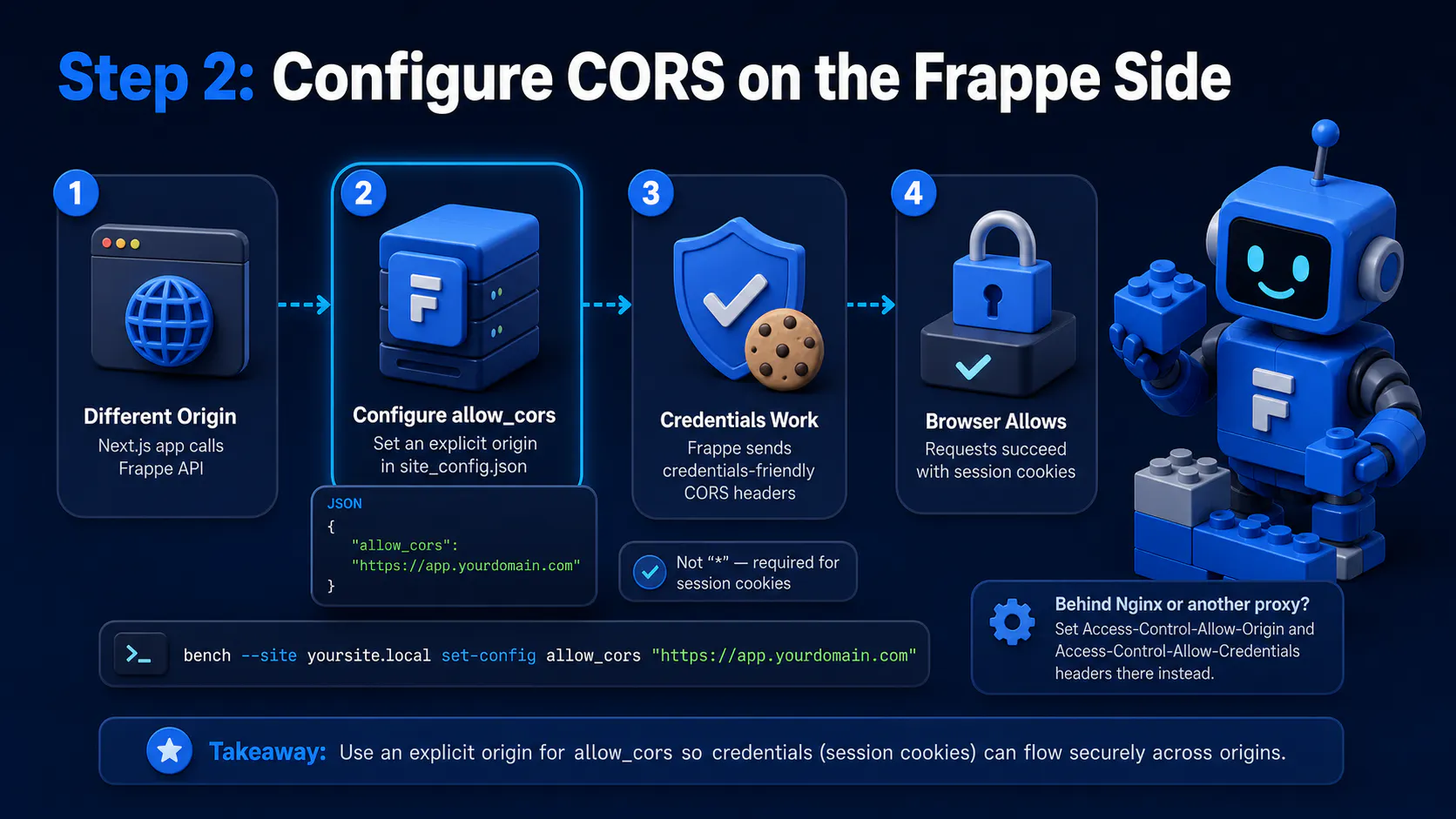
Section visual: Configure CORS on the Frappe Side.
If your Next.js app lives on a different origin than Frappe (e.g. app.yourdomain.com calling api.yourdomain.com), the browser will block the requests until Frappe explicitly allows it. Set this in site_config.json:
{
  "allow_cors": "https://app.yourdomain.com"
}
For session-cookie auth to survive cross-origin requests, you also need Frappe to send credentials-friendly headers, which is why allow_cors should be an explicit origin string rather than "*" — wildcard origins and credentialed cookies are mutually exclusive in the CORS spec.
bench --site yoursite.local set-config allow_cors "https://app.yourdomain.com"
🔧 If you're running behind Nginx or another reverse proxy anyway, it's often cleaner to set the Access-Control-Allow-Origin and Access-Control-Allow-Credentials headers there instead, so CORS policy lives alongside your other proxy rules.
⚠️ Common Mistake: Setting
allow_corsto"*"and then wondering why session cookies never seem to authenticate requests from the browser. Wildcard CORS silently disables credentialed requests — Frappe will look like it's ignoring your cookie entirely.
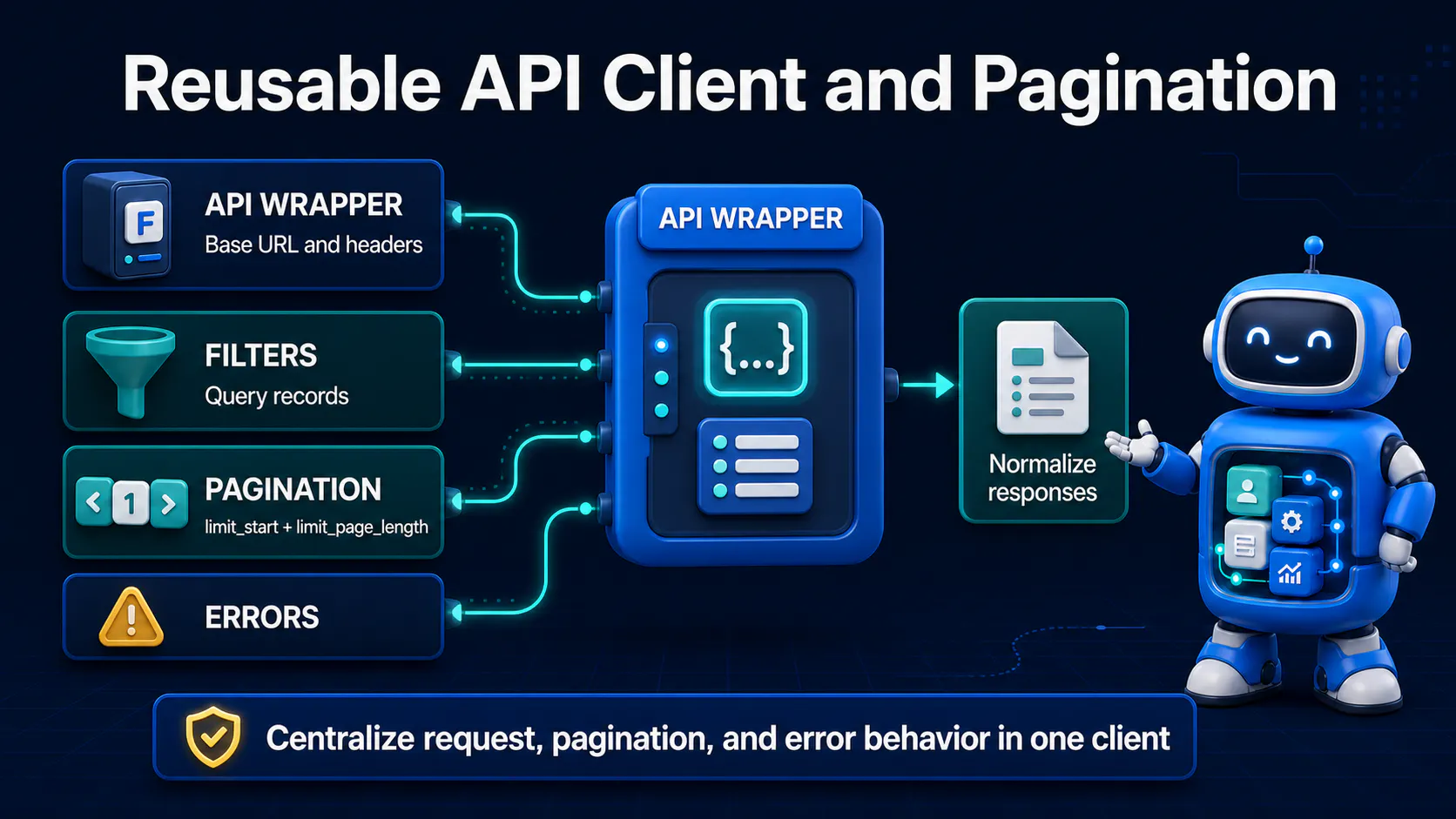
Frappe's REST responses aren't quite bare JSON — list/get calls return { "data": ... }, while whitelisted method calls return { "message": ... }. Unwrap both consistently in one place instead of repeating this logic everywhere:
// lib/frappeClient.ts
const BASE_URL = process.env.FRAPPE_BASE_URL!; // server-only env var

type FrappeEnvelope<T> = { data?: T; message?: T };

async function frappeRequest<T>(
  path: string,
  init: RequestInit = {},
  useApiKey = true,
): Promise<T> {
  const headers: HeadersInit = {
    "Content-Type": "application/json",
    ...init.headers,
  };

  if (useApiKey) {
    // Server-side only — never send this header from browser code
    headers["Authorization"] =
      `token ${process.env.FRAPPE_API_KEY}:${process.env.FRAPPE_API_SECRET}`;
  }

  const res = await fetch(`${BASE_URL}${path}`, {
    ...init,
    headers,
    credentials: useApiKey ? "omit" : "include", // cookies only in session mode
  });

  if (!res.ok) {
    throw new Error(`Frappe request failed: ${res.status} ${res.statusText}`);
  }

  const body: FrappeEnvelope<T> = await res.json();
  return (body.data ?? body.message) as T;
}

export const frappeGet = <T>(path: string) =>
  frappeRequest<T>(path, { method: "GET" });
export const frappePost = <T>(path: string, payload: unknown) =>
  frappeRequest<T>(path, { method: "POST", body: JSON.stringify(payload) });
Every call site now gets back plain data — no .data, no .message, no guessing which envelope shape a given endpoint used.
💡 Pro Tip: Keep this file server-only (inside
lib/and only imported from server components or API routes) if you're using the API-key branch — importing it into a client component would bundle your secret into browser JavaScript.
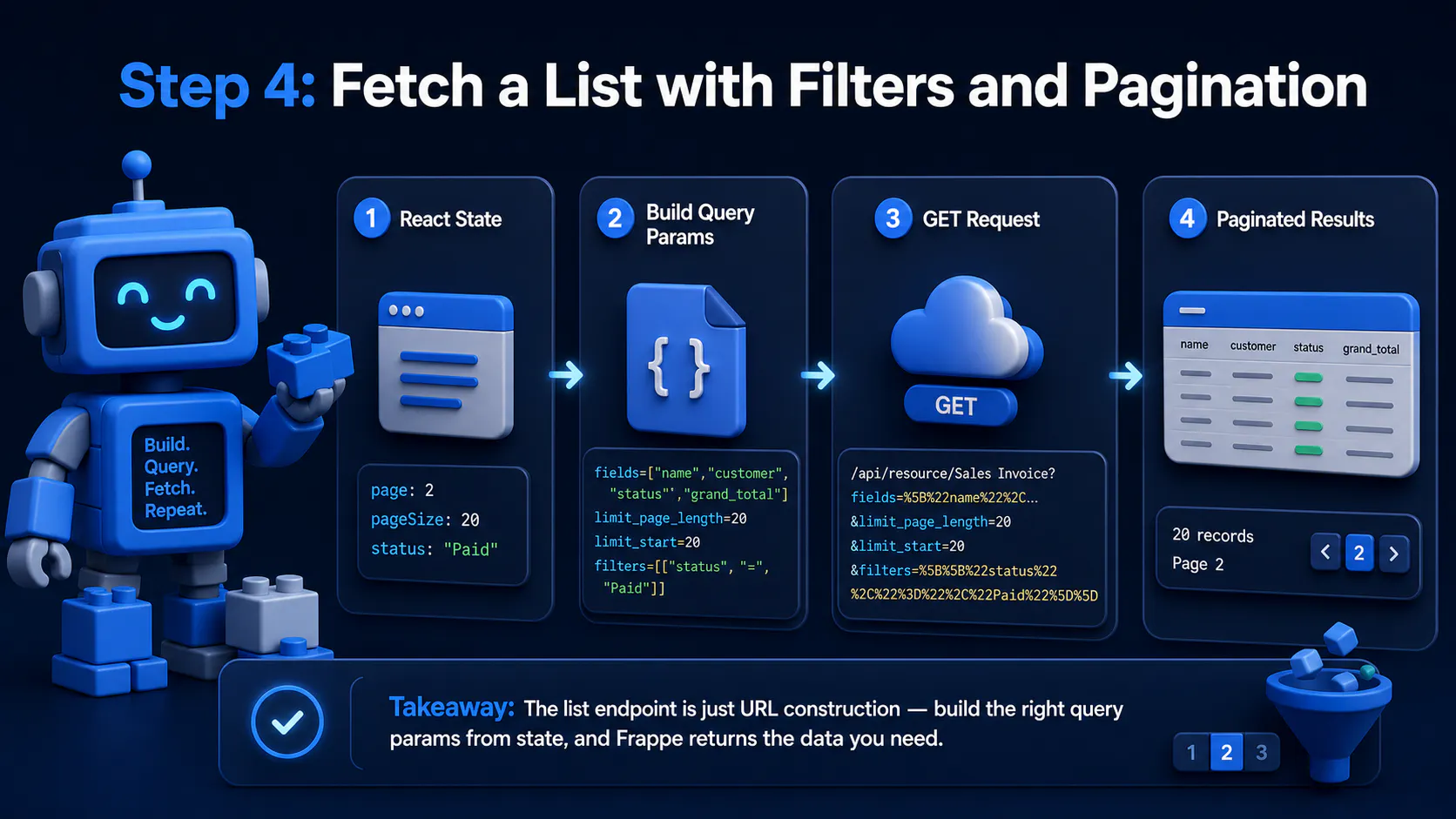
Section visual: Fetch a List with Filters and Pagination.
Frappe's list endpoint (/api/resource/<Doctype>) takes fields, filters, and limit_page_length as query params. Building these from React state is just URL construction:
// lib/getInvoices.ts
import { frappeGet } from "./frappeClient";

interface ListParams {
  page?: number;
  pageSize?: number;
  status?: string;
}

export async function getInvoices({
  page = 1,
  pageSize = 20,
  status,
}: ListParams) {
  const filters = status
    ? JSON.stringify([["status", "=", status]])
    : undefined;

  const params = new URLSearchParams({
    fields: JSON.stringify(["name", "customer", "status", "grand_total"]),
    limit_page_length: String(pageSize),
    limit_start: String((page - 1) * pageSize),
    ...(filters ? { filters } : {}),
  });

  return frappeGet<any[]>(`/api/resource/Sales Invoice?${params.toString()}`);
}
📌 Note that filters has to be a JSON-encoded array of arrays, not a plain object — that's Frappe's list-view filter syntax, and it trips up almost everyone the first time.
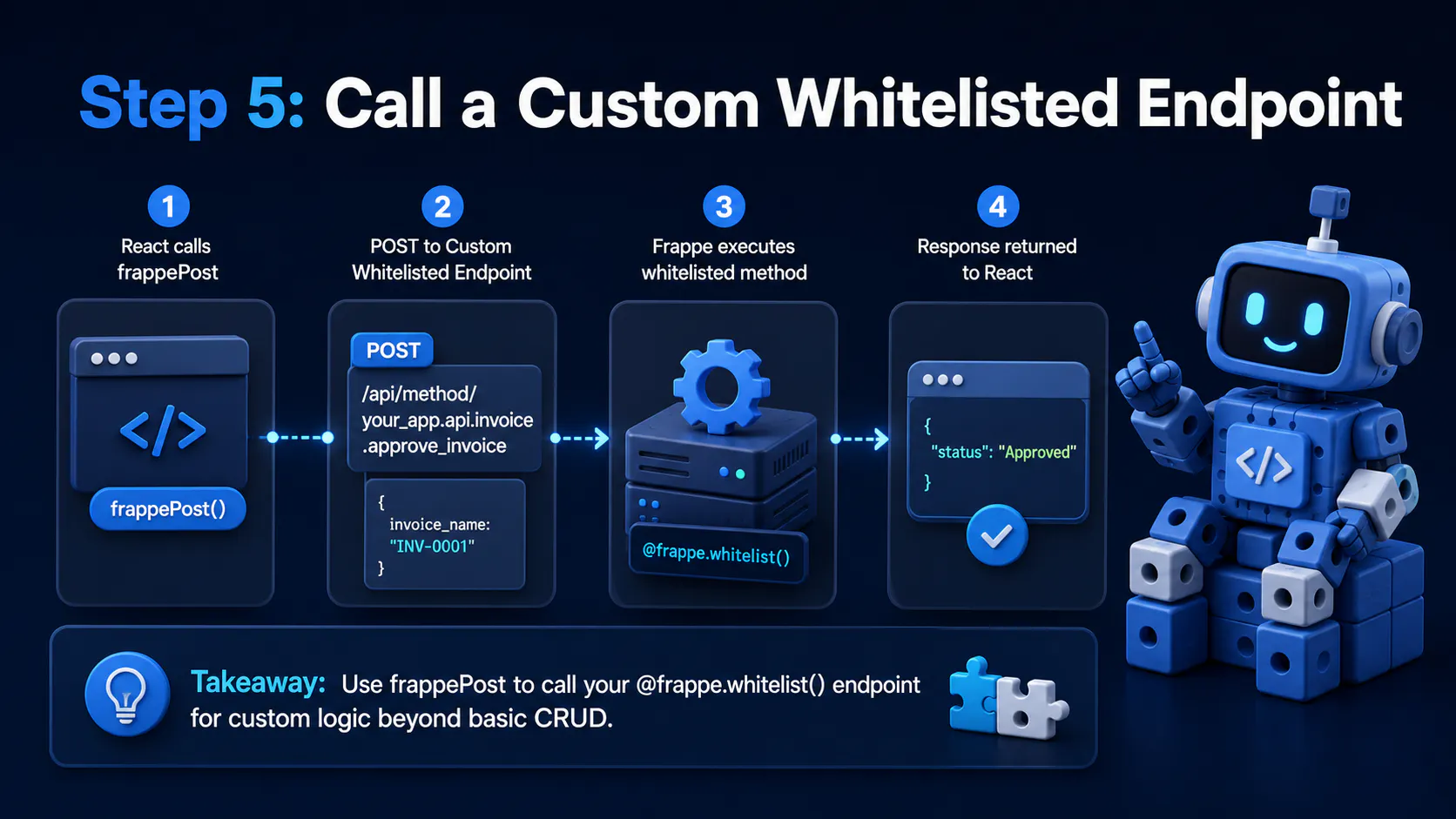
Section visual: Call a Custom Whitelisted Endpoint.
For anything beyond simple CRUD — a computed dashboard summary, a multi-doctype action — you'll be calling a custom @frappe.whitelist() method rather than the generic resource endpoint:
import { frappePost } from "./frappeClient";

export async function approveInvoice(invoiceName: string) {
  return frappePost<{ status: string }>(
    "/api/method/your_app.api.invoice.approve_invoice",
    { invoice_name: invoiceName },
  );
}
If you haven't written one of these yet, the mechanics of @frappe.whitelist() — decorators, allow_guest, argument parsing — are covered in a separate post on this blog; this step assumes that endpoint already exists and just focuses on calling it cleanly from React.
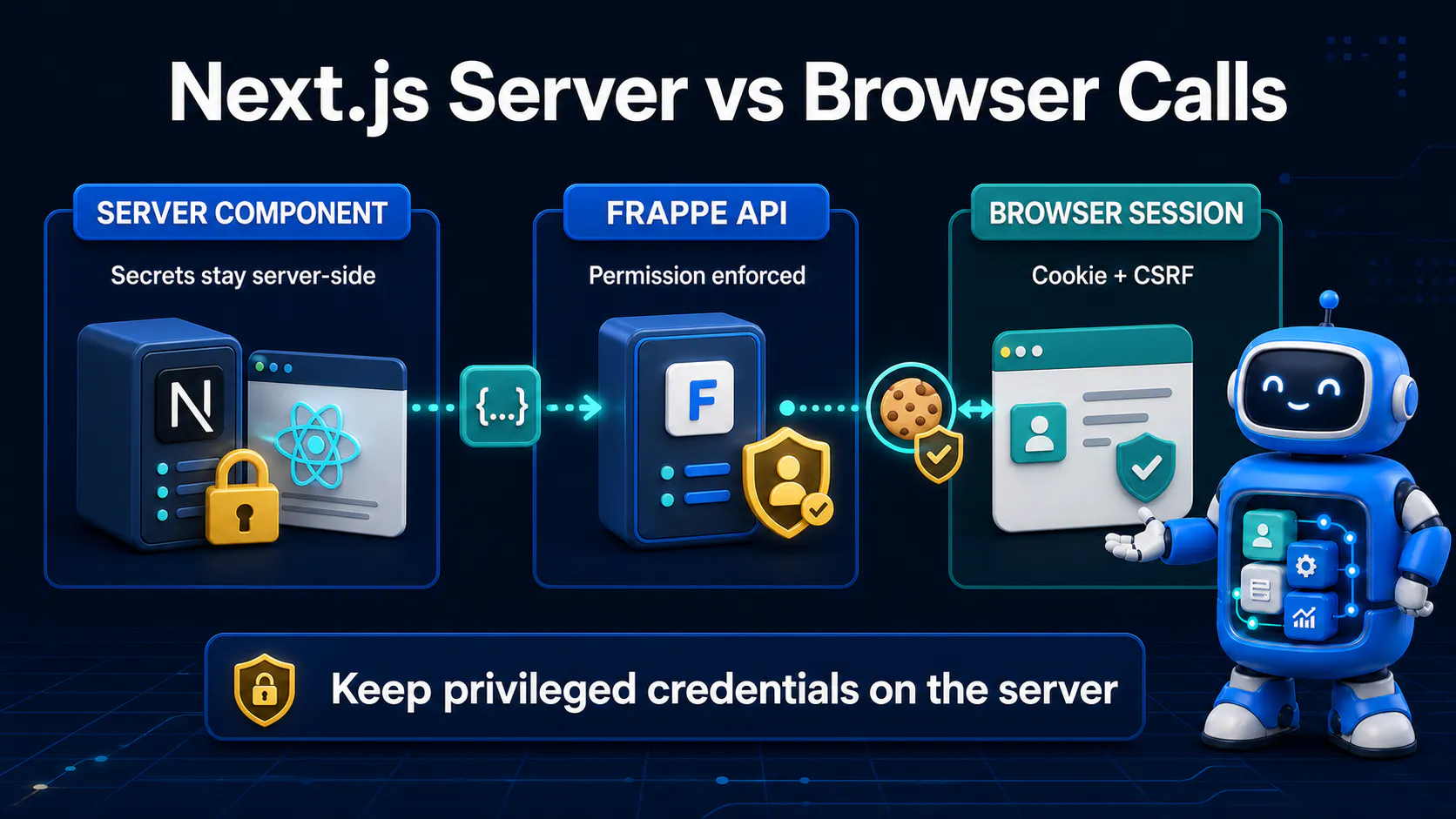
With the client wrapper in place, a server component can fetch and render data with zero client-side secret exposure:
// app/invoices/page.tsx
import { getInvoices } from "@/lib/getInvoices";

export default async function InvoicesPage() {
  const invoices = await getInvoices({
    page: 1,
    pageSize: 20,
    status: "Unpaid",
  });

  return (
    <main>
      <h1>Unpaid Invoices</h1>
      <ul>
        {invoices.map((inv) => (
          <li key={inv.name}>
            {inv.customer} — {inv.grand_total}
          </li>
        ))}
      </ul>
    </main>
  );
}
🔒 Because this runs on the server, FRAPPE_API_KEY and FRAPPE_API_SECRET never reach the client bundle — the browser only ever receives the already-rendered HTML and the plain invoice data.
⚠️ Common Mistake: Copy-pasting this same fetch logic into a
"use client"component withNEXT_PUBLIC_FRAPPE_API_KEY. TheNEXT_PUBLIC_prefix ships the value straight into browser JavaScript — anyone can open dev tools and read your API secret.
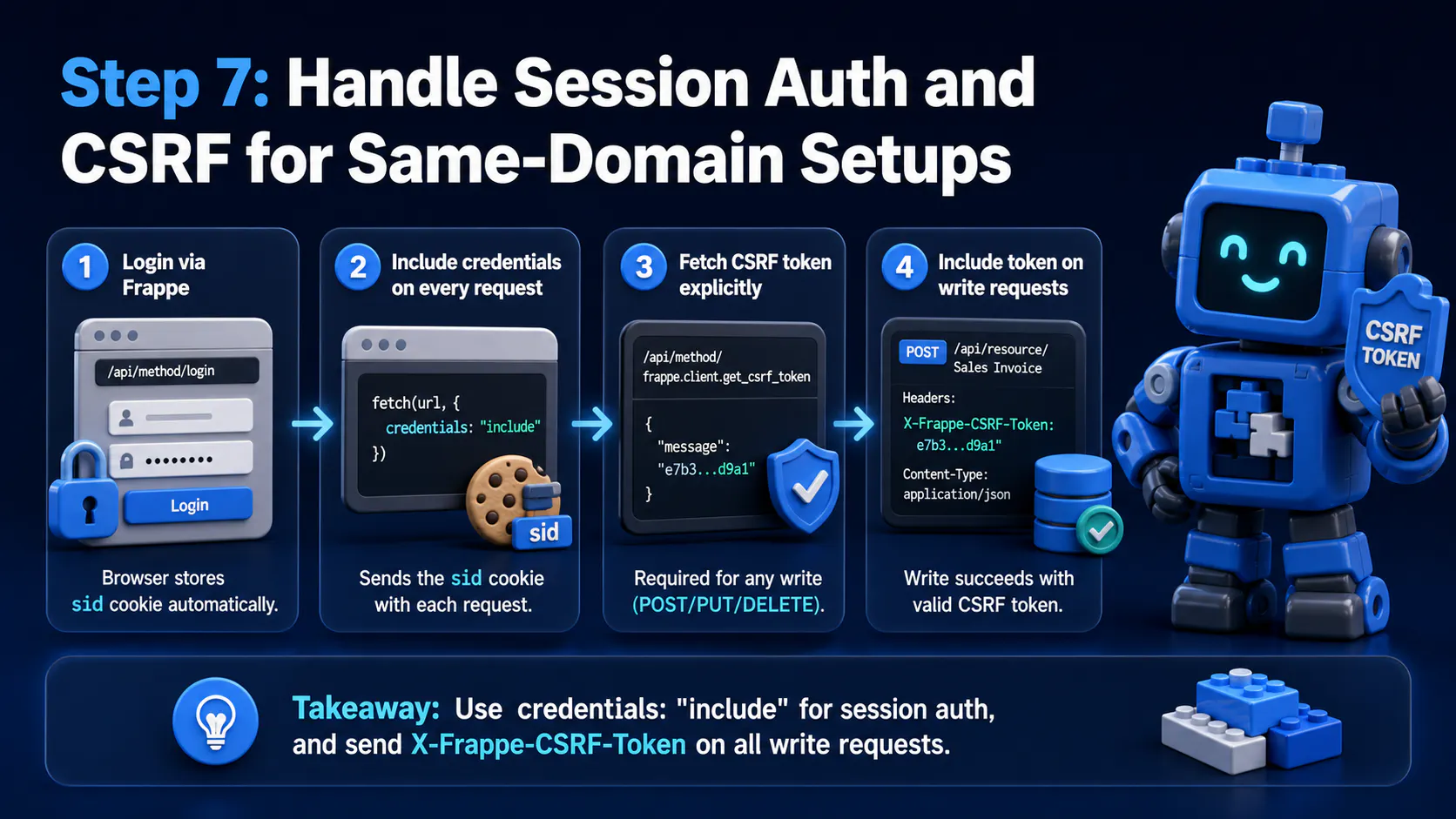
Section visual: Handle Session Auth and CSRF for Same-Domain Setups.
If you're on the session-cookie path instead, login happens through Frappe's normal /api/method/login endpoint, and the browser stores the resulting sid cookie automatically. Every subsequent fetch just needs credentials: "include".
The catch: any write (POST/PUT/DELETE) under session auth needs an X-Frappe-CSRF-Token header, which Frappe injects into the page when Desk itself renders — but your React app isn't Desk, so you need to fetch it explicitly:
const csrfRes = await fetch(
  `${BASE_URL}/api/method/frappe.client.get_csrf_token`,
  {
    credentials: "include",
  },
);
const { message: csrfToken } = await csrfRes.json();

await fetch(`${BASE_URL}/api/resource/Sales Invoice`, {
  method: "POST",
  credentials: "include",
  headers: {
    "Content-Type": "application/json",
    "X-Frappe-CSRF-Token": csrfToken,
  },
  body: JSON.stringify({ customer: "Acme Co" }),
});
⚠️ Common Mistake: Session-based GET requests work fine without a CSRF token, which makes it easy to ship the whole app, only to have every write silently fail (or 400) the moment a user tries to submit a form.
🍪 Also make sure cookies are configured for cross-subdomain sharing if app.yourdomain.com and api.yourdomain.com differ — that means SameSite=Lax (or None with Secure if truly cross-site) and the cookie domain set broadly enough to cover both.
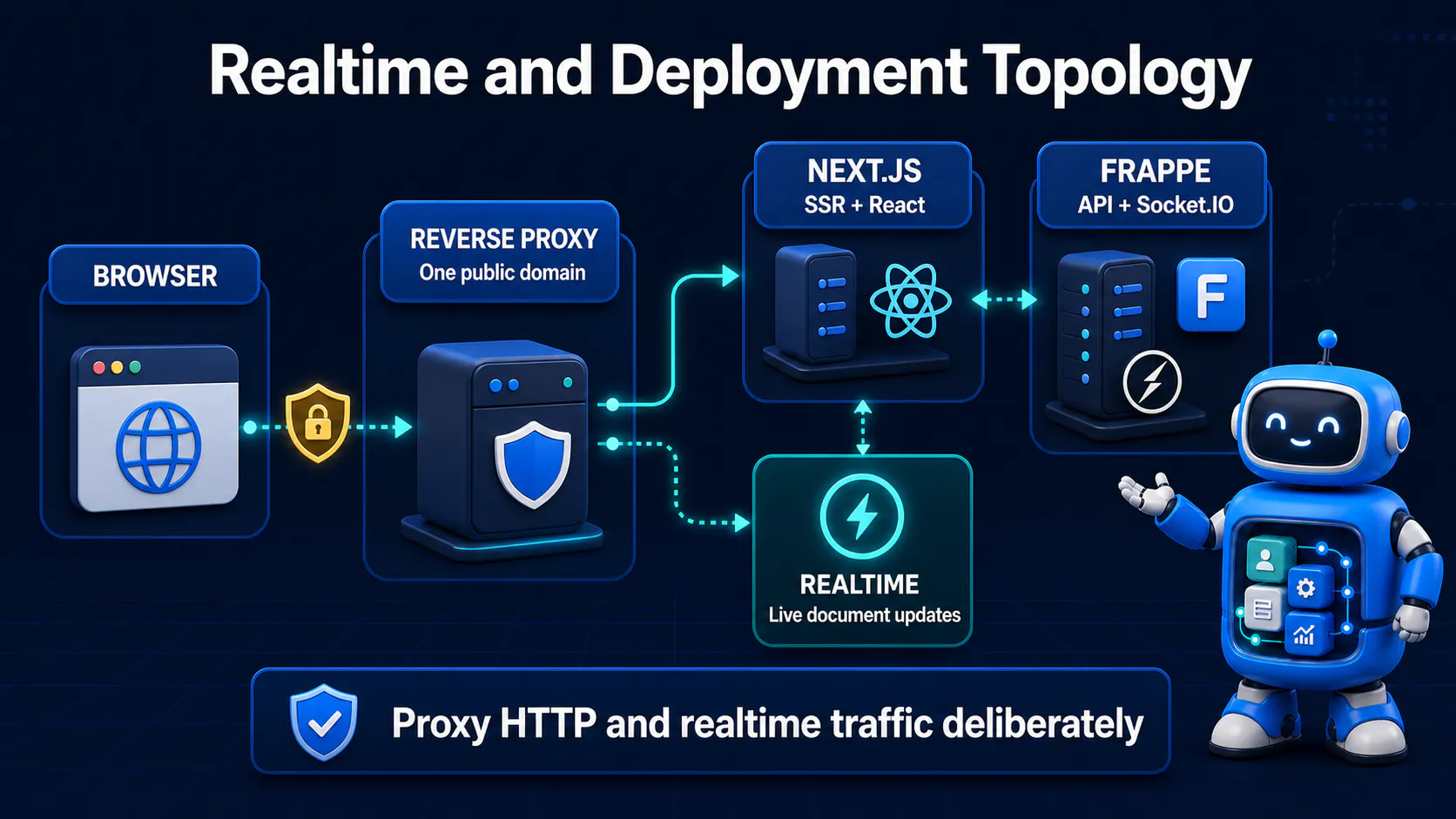
Frappe ships a Socket.IO server that broadcasts document events (doc_update, list_update) to connected clients — the same mechanism Desk uses to live-refresh list views. A React app can subscribe to the same events:
// lib/realtime.ts
import { io } from "socket.io-client";

export function subscribeToInvoiceUpdates(onUpdate: (doc: any) => void) {
  const socket = io(process.env.NEXT_PUBLIC_FRAPPE_SOCKET_URL!, {
    withCredentials: true,
  });

  socket.on("connect", () => {
    socket.emit("doctype_subscribe", "Sales Invoice");
  });

  socket.on("doc_update", (data) => {
    if (data.doctype === "Sales Invoice") {
      onUpdate(data);
    }
  });

  return () => socket.disconnect();
}
🔄 In a client component, call this inside a useEffect and merge incoming updates into local state — this is how you get a list view that updates live without polling.
💡 Pro Tip: The Socket.IO server is a separate process/port from the main HTTP API (often proxied at
/socket.ioin production). Confirm your reverse proxy forwards websocket upgrade headers, or connections will silently fall back to polling or fail outright.
Real-time here is genuinely conceptual scaffolding rather than a drop-in library — the exact event payloads are worth logging once in dev to confirm the shape before you build UI around them.
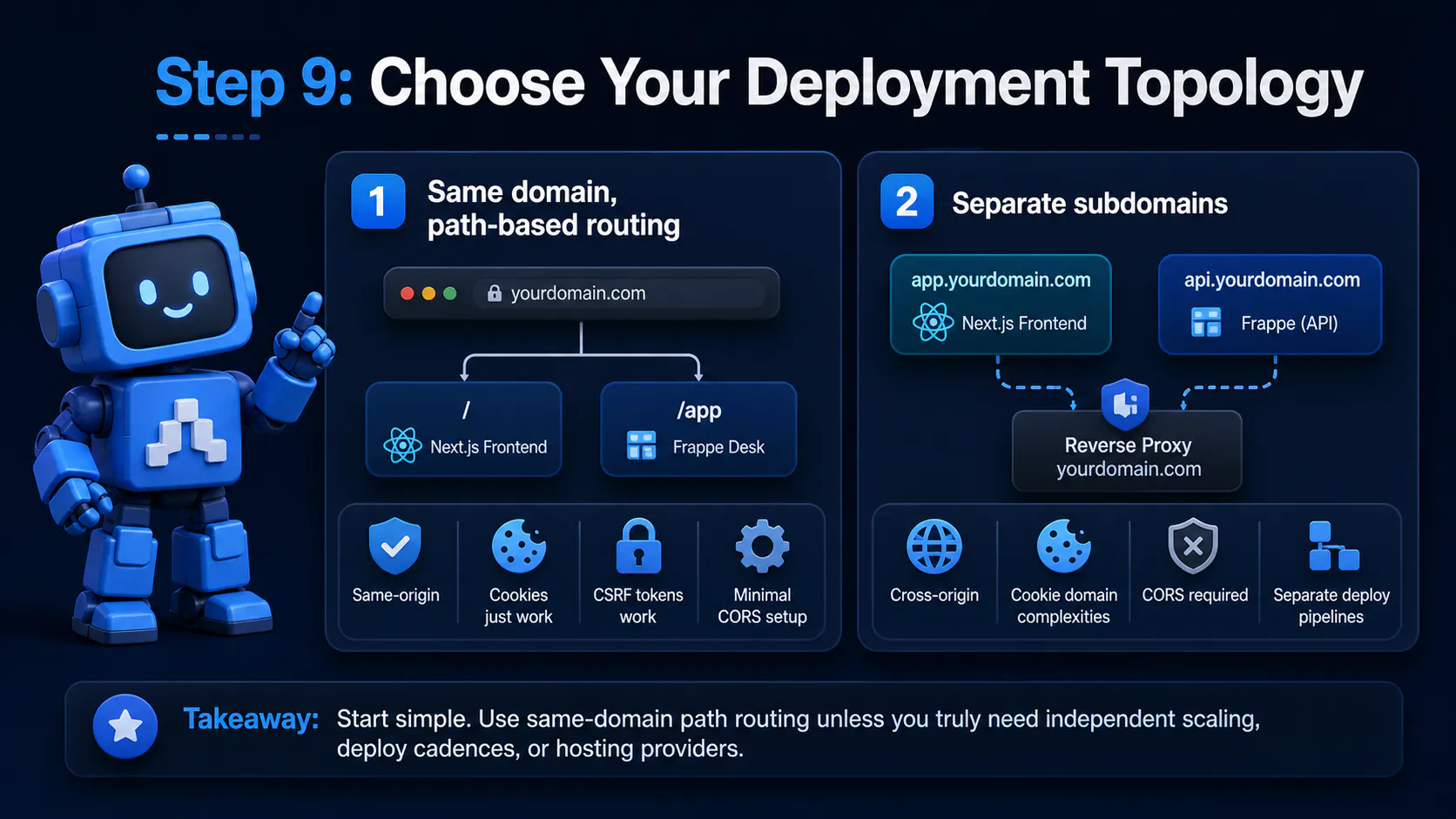
Section visual: Choose Your Deployment Topology.
🏠 Same domain, path-based routing — Frappe Desk lives at /app, your Next.js frontend owns /, both behind one reverse proxy on one domain. Cookies just work, CSRF tokens work, CORS config is barely needed since everything is same-origin.
🌍 Separate subdomains — app.yourdomain.com for the frontend, api.yourdomain.com for Frappe. Cleaner separation of deploy pipelines (Vercel for Next.js, your own infra for Frappe), but now you're fully in CORS-and-cookie-domain territory from Step 2 onward.
✅ For most teams, same-domain path routing is the simpler starting point — you only reach for subdomains when the two apps genuinely need independent scaling, deploy cadences, or hosting providers.
⚠️ Common Mistake: Choosing separate subdomains "for cleanliness" and then discovering session auth basically doesn't work in Safari's default cross-site cookie blocking — at that point the API-key/BFF model in Step 1 becomes close to mandatory.
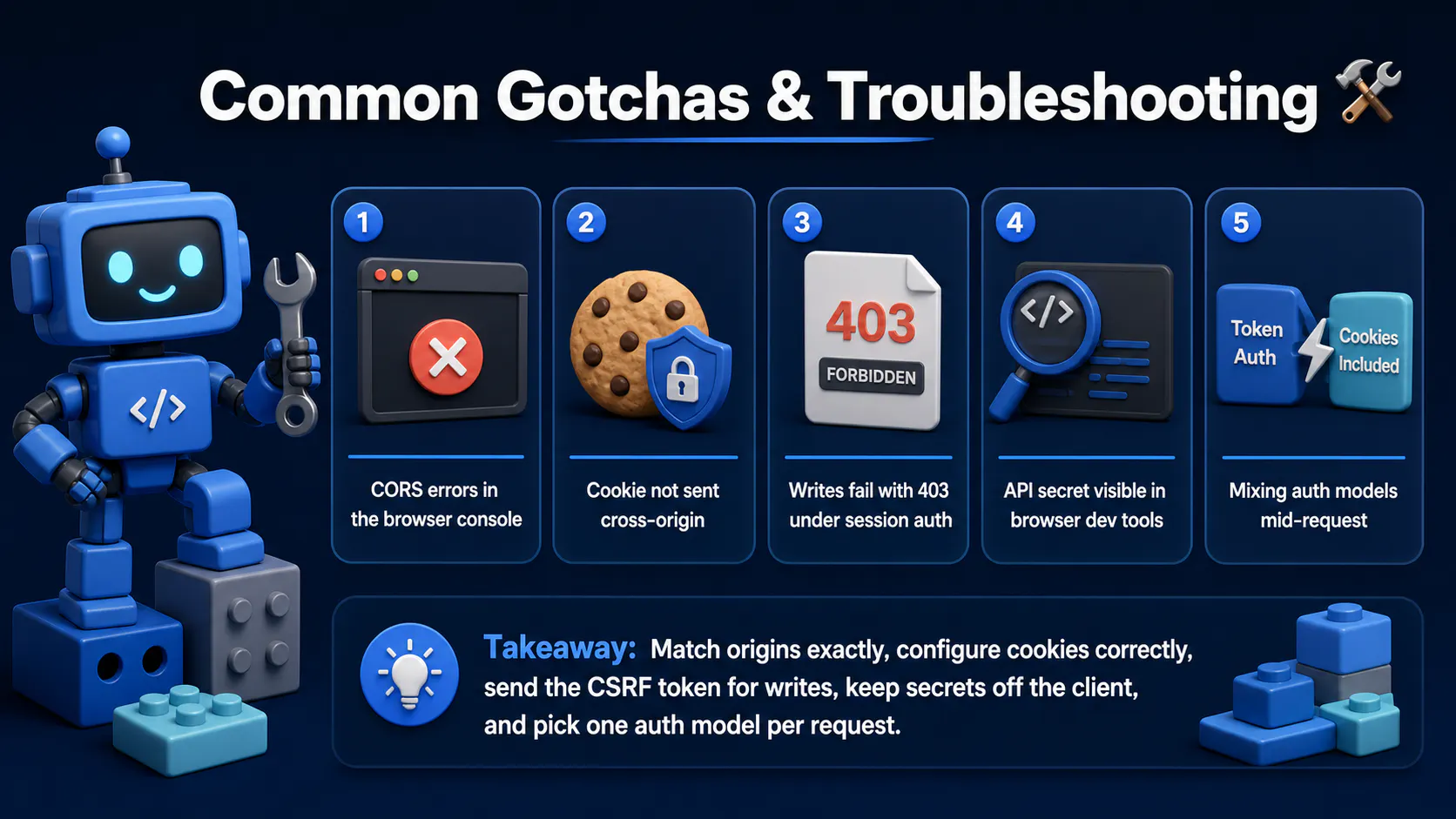
Section visual: Common Gotchas & Troubleshooting.
allow_cors doesn't exactly match the requesting origin (protocol + domain + port all matter) — wildcard "*" won't fix credentialed requestsSameSite and Secure attributes; SameSite=Lax blocks cookies on many cross-site requests, and Secure cookies require HTTPS on both endsX-Frappe-CSRF-Token header — GETs will work fine and mask this until someone submits a formNEXT_PUBLIC_-prefixed env var or a client component importing the API-key wrapper directly — audit your bundle if this happensAuthorization: token ... header and credentials: "include" on the same call is redundant and can produce confusing permission errors — pick one model per requestUpgrade/Connection headers for the websocket handshakeyour-project/
├── frappe-bench/
│ └── apps/
│ └── your_custom_app/
│ ├── your_custom_app/
│ │ └── api/
│ │ └── invoice.py # @frappe.whitelist() methods
│ └── your_custom_app/hooks.py
│
└── frontend/ # separate Next.js repo/deploy
├── app/
│ ├── invoices/
│ │ └── page.tsx # server component, calls lib/
│ └── api/
│ └── invoices/route.ts # optional BFF route
├── lib/
│ ├── frappeClient.ts # envelope-unwrapping wrapper
│ ├── getInvoices.ts
│ └── realtime.ts # Socket.IO subscription helper
└── .env.local # FRAPPE_API_KEY, FRAPPE_API_SECRET (server-only)
📦 Keeping the frontend in its own repo (even if deployed to the same domain via proxy config) reinforces the mental model — Frappe doesn't know or care that React exists on the other side of the API.
Decoupling a Frappe frontend isn't exotic 🧩 — it's the same headless-backend pattern you'd use with any API, just with Frappe-specific envelope shapes and auth quirks to respect. Get the auth model and CORS/cookie config right up front, and everything downstream — fetching, filtering, real-time updates — is ordinary React work. The framework stays the system of record; your React or Next.js app just gets to be the interface your users actually deserve. ✨

Getting the claude-vscode.editor.openLast not found error after updating Claude Code? This step-by-step guide shows you how to roll back to a stable version and get Claude working again in 5 minutes.
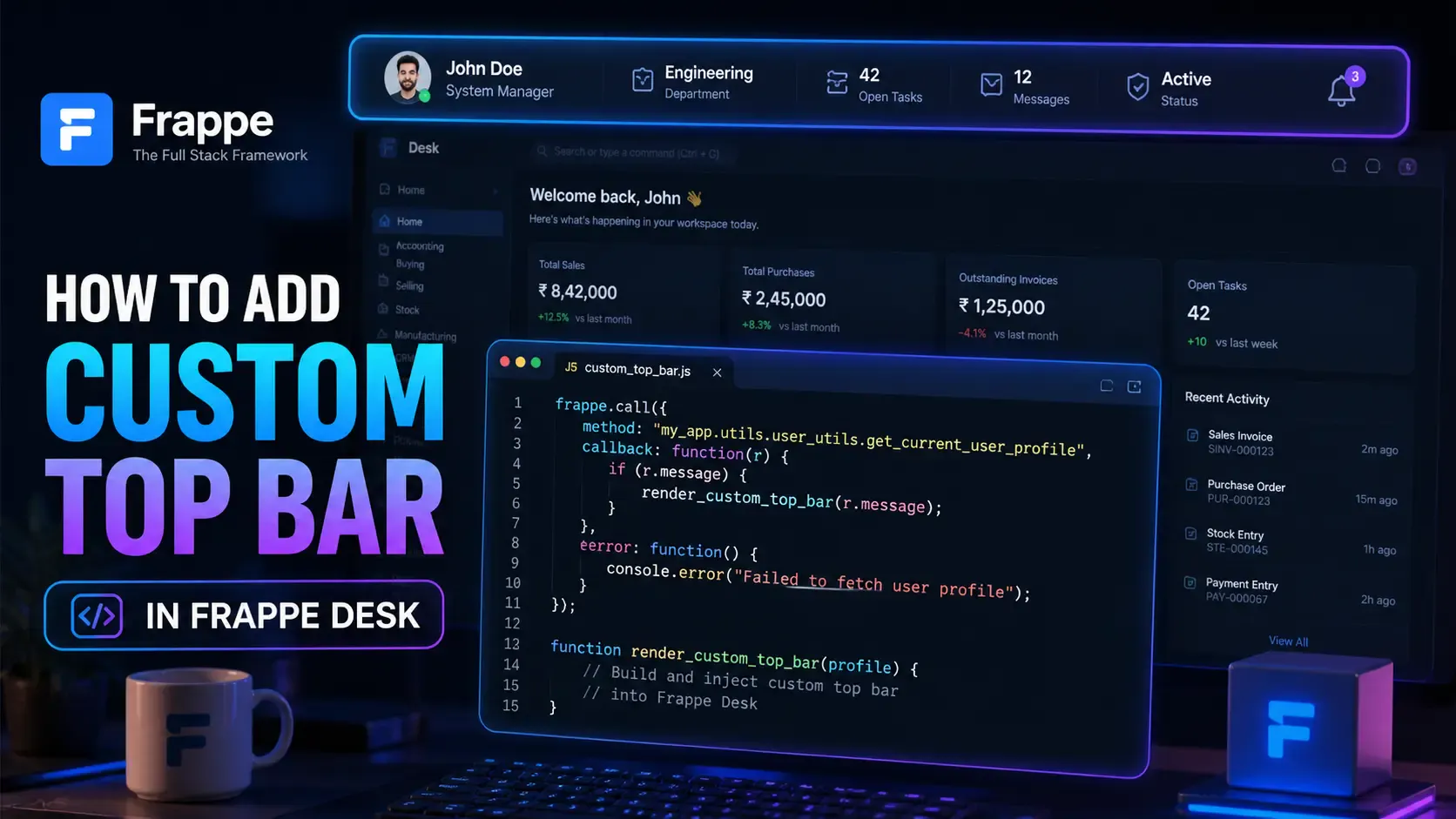
Learn how to enhance your Frappe Desk UI by adding a custom, dynamic top bar. Follow this beginner-friendly, step-by-step tutorial to display user profiles, statuses, and more!

Universal DB MCP connects Claude, ChatGPT & Cursor to 17 databases. Ask questions in plain English, get instant data — no SQL needed. Here's how it works.